ClimateCruise
- 4.2
- Rating
- 10.00K
- Installs
- Free
- Price
 Analysis by App-foxy
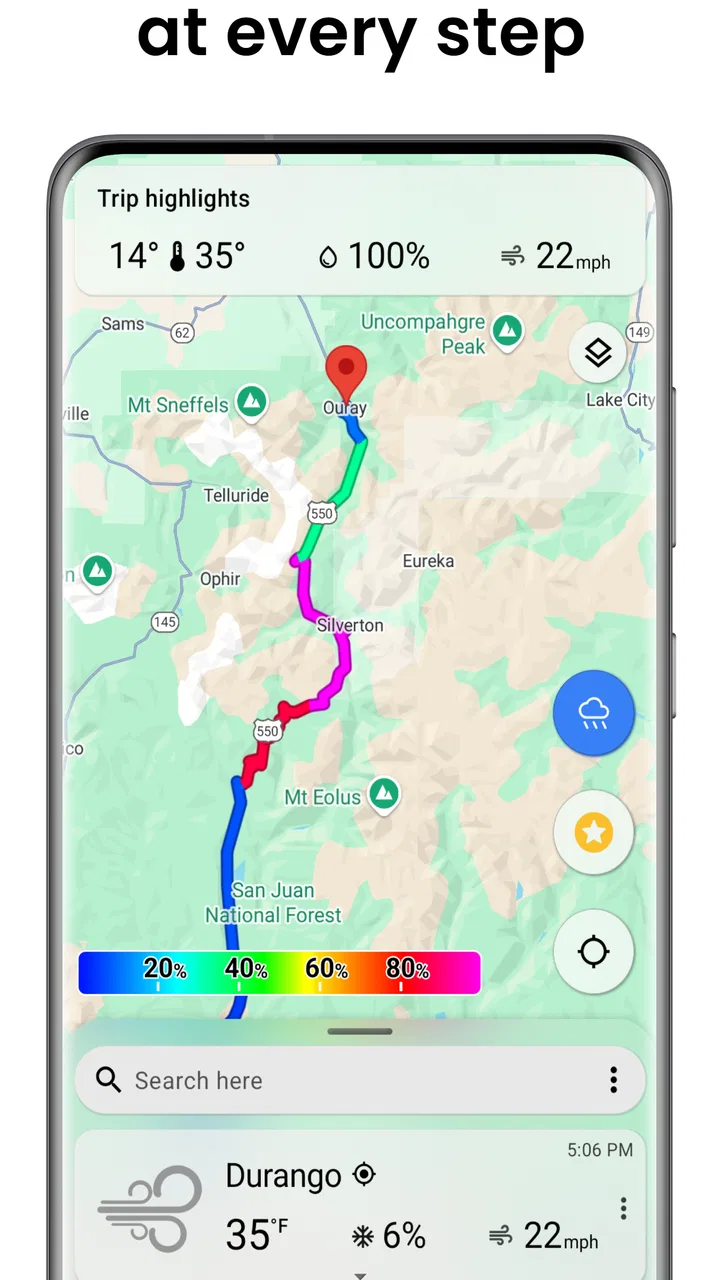
I found ClimateCruise most useful when I wanted to compare the weather along an entire journey instead of checking one city at a time. It is a free weather app from DurkesLLC, aimed at people who plan road trips, day excursions, or multi-stop travel and want the forecast viewed as one travel problem. That focus makes it more interesting than another basic screen showing the conditions outside my current window.
My first impression was that the idea is practical but depends heavily on how clearly I define a trip. A normal weather app is usually built around “where I am now,” while this one is intended for looking ahead across a route. That difference matters. If I am deciding whether to leave early, stop somewhere overnight, or pack for changing conditions, a journey-wide view can be more useful than opening several separate forecasts and trying to remember them.
The app has a 4.2 average from around 33 ratings, with over 10K installs. Those figures suggest a small but real user base rather than a heavily established mainstream service. I would treat that as a reason to test it for my own travel habits, not as a warning by itself. ClimateCruise is free to start, is rated for Everyone, and includes optional in-app purchases priced at $1.00 per item. The current version is 4.5.8, and it requires an operating system version of 12 or newer.
You May Also Like

 Pandora - Music & Podcasts
Pandora’s Music Is Easy to Start, but Harder to Recover
Pandora’s strength is its low-effort path from a seed to a station. Its weak spot is how much confidence it asks you to place in connection, setup, and quiet recovery.

 8 Ball Pool
 Is Built on Rivalries, Rematches, and Routine
A close look at the rivalries, rematches, shared routines, and unanswered safety questions that turn a quick pool match into a persistent mobile community.

 Samsung Music
’s Quiet Strength Is Playing What You Already Own
Its reach comes less from spectacle than from dependable access to a personal library. That simplicity is both the app’s strongest retention engine and its ceiling.

 AccuWeather: Weather Radar
AccuWeather Review: A Quick, Clear Forecast for Everyday Decisions
For everyday plans, the best forecast is the one you can understand quickly. AccuWeather makes rain timing, radar, and local conditions easy to act on, with a few trade-offs.

 Hill Climb Racing
Why Hill Climb Racing Still Turns Crashes Into One More Run
A tiny car, a bumpy hill and one more upgrade: Hill Climb Racing keeps resurfacing because its simple chaos makes every near-miss feel personal.

 AliExpress - Shopping App
AliExpress Makes Global Shopping Feel Personal, but Shoppers Bear the Risk
AliExpress turns a global marketplace into a pocket-sized discovery engine. Its reach is useful, its shopping loop compelling, and its trade-offs easy to miss.
More From Our News Desk
View All News


Getting past the first points of friction
I’d use this section to look beyond whether the route view is convenient and consider how the workflow feels for people with different ways of reading, navigating, or entering information. A useful first test is to build a short trip at a comfortable pace, then notice which parts feel clear and which require extra attention before relying on it for a busy travel day.
Why the route view can feel less immediate
The biggest adjustment is mental: this is not simply a replacement for the weather widget already on my phone. A conventional weather app often gives instant value because it already knows my location or opens on a familiar city. With a trip-focused tool, I need to think in terms of destinations and sequence. If I approach it expecting an automatic local forecast first, the opening experience may feel less obvious.
That does not mean the app is difficult, but it does mean the quality of the result depends on careful input. When I plan a drive, I would enter the meaningful stops rather than every place the road passes through. For example, a departure point, a lunch stop, and the overnight destination usually tell me more than a long list of minor towns. Too few points can hide changes between locations, while too many can make the trip harder to read.
A useful habit is to decide what question I am asking before setting up the journey. “Will rain affect the whole drive?” is different from “Which stop is best for an outdoor break?” The first calls for a broad route view; the second benefits from comparing a few specific stops. Thinking this way prevents me from treating every weather detail as equally important.
Small setup checks that save time
I would begin by checking the device requirement before trying to install it. ClimateCruise needs version 12 or later of its supported operating system, so an older phone or tablet may be the real reason the app cannot be installed or updated. This is a simple check, but it avoids wasting time troubleshooting an app that the device cannot properly support.
After installation, I would keep the first test deliberately small. I would create a short, familiar journey rather than immediately building a complicated holiday itinerary. A nearby route makes it easier to notice whether the locations were entered correctly and whether the result matches what I already understand about the area. Once that basic test makes sense, I would move on to a longer trip.
Location spelling is another practical detail worth checking. Similar place names, suburbs, and neighboring towns can lead to an outcome that looks wrong even when the application is behaving normally. If a forecast seems strangely different from what I expected, I would inspect each stop and confirm that it represents the intended place, rather than assuming the weather information itself is faulty.
The most useful setup rule is to verify the route before judging the forecast. A misplaced stop can create a misleading comparison, especially when nearby areas have different elevations, coastlines, or local weather patterns. I would also avoid entering a landmark or informal nickname unless it is clearly recognized as the place I mean.
What to do when a trip does not look right
If a journey appears incomplete, I would first review the entries from beginning to end. I would check whether the starting point was accidentally omitted, whether the destination was duplicated, and whether a stop was saved in the wrong order. These are ordinary workflow mistakes, but they can make the whole display feel unreliable.
Next, I would close and reopen the app, then repeat the same simple test. If the issue affects only one route, I would rebuild that route rather than repeatedly editing a complicated version. Recreating a short trip is often faster than trying to identify which individual entry caused the confusion. I would keep the original details written down until the replacement works, especially before deleting a carefully prepared itinerary.
When the app shows an older-looking result, I would avoid making an immediate travel decision from it. Weather information changes, and a route forecast can become less useful as the departure time moves. My practical approach would be to refresh the view before leaving and compare it with a trusted general weather source for the places that matter most. ClimateCruise is helpful for organizing a journey-wide picture, but I would not use any single forecast screen as the only basis for a safety-critical decision.
Separating app trouble from phone or network trouble
Some apparent failures are not caused by ClimateCruise. If the rest of the phone cannot load current information, the problem may be connectivity rather than the app. I would test another ordinary website or weather service, switch between available connections if appropriate, and try again later. This is especially important when a route is being prepared away from home, where a weak connection can make an app seem frozen.
A full restart of the device is also a reasonable general step when the interface becomes unresponsive. If the application behaves normally after restarting, I would continue with the trip rather than changing several settings at once. Changing too many things makes it harder to know what actually solved the problem.
Storage and system updates can also affect everyday reliability. I would make sure the phone has enough free space and that the operating system is not waiting for a major update. Since the app requires a relatively modern system version, keeping the device current is more relevant here than it would be for an old, lightweight utility.
If only one destination produces an odd result while other places work, I would suspect the location entry before suspecting the entire application. If every route fails in the same way, I would record the steps that reproduce the problem and contact DurkesLLC through the normal support path available with the app. A clear description of the route, device behavior, and what I already tried is more useful than simply reporting that “weather is wrong.”
Using the app as a travel planning tool
I’d treat the travel-planning view as a starting point for decisions, not as a substitute for every other source of weather information. In this section, I’ll focus on how route-based comparisons can support practical choices while also considering when a simpler local forecast or a more specialized service may be easier to use.
A realistic day-trip workflow
Imagine I am planning a Saturday drive with a morning departure, a stop at a town for lunch, and an afternoon destination. I would use ClimateCruise before packing, not just while already on the road. First I would enter the route in its actual order. Then I would look for differences between the stops: a wetter destination, a colder section, or conditions that make an outdoor break less appealing.
The important insight is that the app can change the decision itself, not merely tell me whether to carry an umbrella. If the middle stop looks uncomfortable, I might shorten the break, move it earlier, or choose an indoor alternative. If the final destination has a different pattern from the departure point, I would pack for the destination rather than trusting the conditions outside my home.
I would save a final check for shortly before leaving. That reduces the chance of planning around information that has become stale. On a longer journey, I would also identify the one or two stops where weather matters most. This keeps me from overreacting to minor differences at places where I will only pass through.
Three less obvious ways I would use it
First, I would use the route view to plan clothing and luggage in layers. Instead of packing based on the starting city, I would compare the places where I expect to spend real time. This is particularly helpful when the trip crosses several local climates. The app’s value is not only the forecast itself; it is the reminder that a single trip can contain several different packing decisions.
Second, I would use it to choose a better stopping rhythm. A weather change between two points can suggest where a break should happen, even if the original plan was based only on distance. That turns a forecast into a scheduling aid. I would still keep the plan flexible, because a route display cannot account for every traffic delay or personal change of mind.
Third, I would use a short route as a sanity check before committing to a major itinerary. If I am unsure whether a long journey is worth planning around, a smaller test helps me learn how the app presents locations and how much detail I personally find useful. This is a better approach than building a dozen stops and then discovering that my preferred planning style does not match the app’s workflow.
Where the usual weather alternatives are better
For a quick glance at current conditions, my phone’s built-in weather tool is usually faster. It tends to be the better choice when I only need the forecast for home, work, or one familiar city. ClimateCruise earns its place when the question involves movement between several places. I would not open it for every casual weather check.
Large weather services may also be preferable when I want a broad set of specialized information, such as extensive radar, detailed alerts, or long-term historical context. I would choose those tools when the decision depends on advanced meteorological detail. ClimateCruise appeals more to the traveler who wants the weather arranged around a trip rather than a large collection of separate weather instruments.
That trade-off is important for expectations. A route-centered app does not need to win every comparison. Its strength is reducing the mental work of checking several destinations. Its weakness is that someone who wants a deep weather laboratory may find a general-purpose service more complete or more familiar.
Who should use it, and who should skip it
I would recommend it to road-trippers, families planning outdoor days, commuters who regularly cross regions, and anyone who finds themselves opening multiple forecasts before leaving. It is also a sensible option for people who prefer a visual travel overview instead of manually writing down conditions for each stop.
I would be more cautious about recommending it to someone who rarely travels beyond one local area. If nearly every weather question concerns the same neighborhood, a standard weather app will probably be quicker. I would also skip it as my only tool for severe-weather decisions, aviation, marine activity, or other situations where official alerts and specialized information matter more than route convenience.
The free entry point makes experimentation easy, while the optional $1.00 items mean I would pay attention to what is unlocked before purchasing anything. I would not assume that an optional purchase is necessary for a basic trial. I would first confirm that the route-planning workflow fits my needs, then decide whether any paid item genuinely improves the way I travel.
My final take after using its approach
ClimateCruise is a focused weather app rather than an all-purpose replacement for every forecast service. I like the central idea because it matches a real planning problem: weather changes while I move, and checking one location at a time can hide that. The app is most convincing when I use it before a journey to compare meaningful stops, adjust timing, and pack for the places where I will actually spend time.
Its main friction comes from the same focus that makes it useful. I need to enter routes carefully, confirm locations, and understand that the result is only as good as the trip I define. Network conditions, device compatibility, stale information, or ambiguous place names can all look like app failures. A patient setup and a quick second check with another weather source make the experience more dependable.
With version 4.5.8, DurkesLLC presents a tool that is easy to justify for travelers but unnecessary for people who only want a local forecast. I would install it for road trips and multi-stop plans, test it on a short familiar route, and keep a conventional weather service available for alerts or detailed analysis. My practical verdict is that it is worth trying when your weather question includes the words “along the way.”
FAQs for ClimateCruise
01What is ClimateCruise, and what does the app do?
ClimateCruise is designed to help users understand the climate impact of their travel choices, particularly when planning or comparing journeys. It may present estimated emissions, route information, and travel-related sustainability insights in a simple mobile interface. The exact features can vary by version and region, so users should review the current app description and permissions before downloading.
02How accurate are ClimateCruise’s carbon-emission estimates?
ClimateCruise’s emissions figures should be treated as estimates rather than exact measurements. Calculations can depend on factors such as transport type, distance, vehicle efficiency, passenger numbers, traffic, fuel source, and travel conditions. The app is useful for comparing options and encouraging more sustainable decisions, but it should not be considered a certified environmental report or a substitute for official emissions data.
03Does ClimateCruise require an internet connection or location access?
Some ClimateCruise functions may require an internet connection to load maps, calculate routes, update climate information, or synchronize travel data. Location access may also be requested if the app offers nearby journey planning or automatic trip detection. You can usually review or change these permissions in your device settings, although restricting them may prevent certain features from working correctly.
04Is ClimateCruise free to download and use?
The availability of free features, premium tools, advertising, or in-app purchases depends on the current Android or iOS version. Before installing ClimateCruise, check its official store listing for pricing details, subscription terms, and any limitations placed on the free version. If a subscription is offered, confirm the renewal conditions and cancellation process through Google Play or the App Store.
05Is ClimateCruise suitable for planning everyday trips and holidays?
ClimateCruise can be helpful for people who want to consider environmental impact when choosing between different travel options. It may work well for comparing everyday commutes, road journeys, or broader travel plans, depending on the features available in your region. However, users should still verify practical details such as schedules, fares, road conditions, safety information, and booking requirements through official providers.
Pros
- Clear climate data helps users plan routes more comfortably.
- Cruise-focused information is useful for comparing travel conditions.
- The app can make weather-related decisions easier while traveling.
- A specialized interface may be less overwhelming than general weather apps.
- Helpful for users who want climate insights before booking a cruise.
Cons
- Coverage may be limited for smaller ports or less popular destinations.
- Forecast accuracy can vary depending on location and data availability.
- Some features may require an internet connection while traveling.
- Climate information may not replace detailed marine safety forecasts.
- Users may need another app for broader travel planning and alerts.

ClimateCruise
Gallery